Database Browser Report
Report generation
Proper setup of database browser is required. Read more
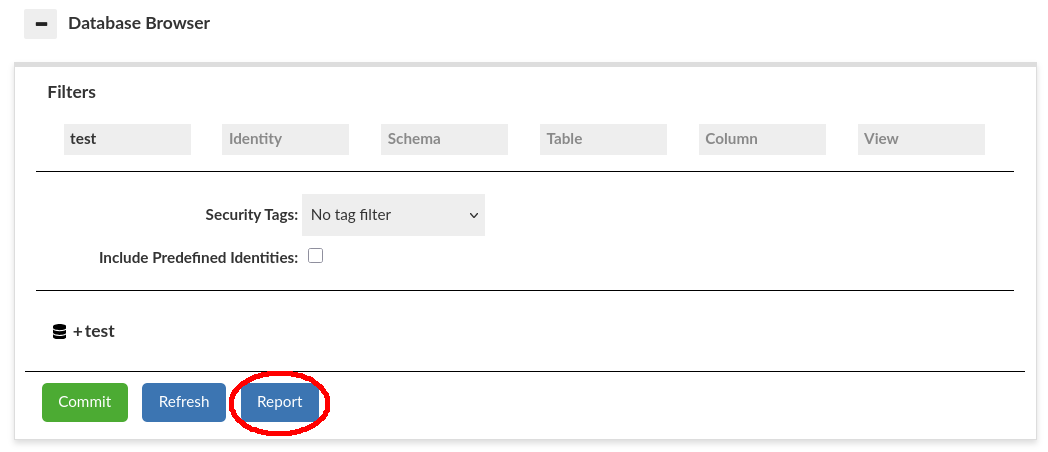
To generate the report, go to Database Browser in Heimdall GUI. By clicking the Report button at the bottom of this section, you can generate and download a report of the data source structure for the currently selected filters. This process will take a while, which depends on the database type and its size. Not all object types and metadata present in the browser are included in the report yet. The Heimdall dev team works on this feature.
This report output is a JSON file which includes a view of all users and roles configured on the database, and all the access down to the column level the users and roles have. The report can be considered a form of access discovery, specific for the database, and helps to normalize audits of different database types. The call to generate this report can be triggered with an automated API call, so it can tie in with a periodic auditing system that spots changes to the privileges for a compliance team.
Each non-column element of the report has a checksum calculated from its direct components. Checksums do not include deeper nested subcomponents. They are also not guaranteed to remain the same for different report filters.
Supported database types
The supported databases are PostgreSQL, Greenplum, Redshift, MySQL, SQLServer, and Oracle.
Warning: Reports in SQLServer with inherited privileges are not functional yet.
File name
The output file is named using the following default format:
{dataSourceName}_report_{tag_}{yyyyMMddHHmm}.json
Where:
dataSourceNamethe Data Source for which the report is generatedtag_is optional and included only when a tag filter is appliedyyyyMMddHHmmrepresents the timestamp of when the generation process starts
Filtering behavior
With no (empty) filters applied, the generated report will include all accessible databases, schemas, tables, views, columns, and identities as well as identity memberships (e.g., what roles were given to the user). For each database element there is a section that lists privileges of given identity on such element, skipping ones that do not have any except at the database level (global scope).
Additional filters information:
- When identity filter is present, all table level elements (tables, views) and below (columns) that the identity does not have any privileges on are omitted. In the identity section the membership is included whenever the matching identity is either grantee or granted.
- When table filter is present, and view is not, all views are omitted.
- When view filter is present, and table is not, all tables are omitted.
Report Format
Report output is a JSON file with 4 levels of depth:
- database(0)
- schema(1)
- table(2)
- column(3)
Each database element uses its name as the key of its corresponding section.
Example of generated report (filters applied to significantly reduce its size):
{
  "test" : {
    "checksum" : "c6bdcfaa5caa2781f3b5a03dfa78223e42737526ad5953168b1a9f0b40916803",
    "identityMemberships" : [ {
      "granteeName" : "user1",
      "checksum" : "9c2ef40992e24934e4bbe6803782e31c4eaf17fd30b2b3ebc4000c230ceaf52a",
      "granted" : [ {
        "identityGranted" : "role2",
        "grantedType" : "ROLE",
        "sources" : [ "granted by test" ],
        "adminOption" : false
      }, {
        "identityGranted" : "role3",
        "grantedType" : "ROLE",
        "sources" : [ "inherited from role2" ],
        "adminOption" : false
      } ]
    } ],
    "privileges" : [ {
      "privileges" : [ "INHERIT", "LOGIN" ],
      "users" : [ "user1" ]
    } ],
    "schemas" : {
      "public" : {
        "checksum" : "80eb515836b8a495e419ea12fcf834e95613795760bbbfa3dc9abb146862a7d7",
        "tags" : [ "tag1" ],
        "privileges" : [ {
          "privileges" : [ "CREATE", "USAGE" ],
          "users" : [ "user1" ]
        } ],
        "tables" : {
          "mytable" : {
            "checksum" : "20750efe2e341921ad3b6520c7f41762aa2413d8f5a7a512cba225a199868610",
            "privileges" : [ {
              "privileges" : [ "SELECT" ],
              "users" : [ "user1" ]
            } ],
            "columns" : {
              "a" : {
                "dataType" : "integer",
                "privileges" : [ {
                  "privileges" : [ "SELECT" ],
                  "users" : [ "user1" ]
                } ]
              }
            }
          }
        },
        "views" : {
          "pg_stat_statements_info" : {
            "checksum" : "c9abe36218c006d1bff66ae4eb4cf9f011598f325105d80eda41324e59b87882",
            "privileges" : [ {
              "privileges" : [ "SELECT" ],
              "users" : [ "user1" ]
            } ],
            "columns" : {
              "dealloc" : {
                "dataType" : "bigint",
                "privileges" : [ {
                  "privileges" : [ "SELECT" ],
                  "users" : [ "user1" ]
                } ]
              },
              "stats_reset" : {
                "dataType" : "timestamp with time zone",
                "privileges" : [ {
                  "privileges" : [ "SELECT" ],
                  "users" : [ "user1" ]
                } ]
              }
            }
          }
        }
      }
    }
  }
}
Any database element
Each database element with child elements (not columns) includes a checksum as its first parameter, derived from its direct children. When filters are applied, and different children are included or excluded, the checksum may change even if no privilege change occurred.
Each database element with tags assigned in the database browser lists them in its parameters. Elements without tags do not include this section.
Privileges on any database element are grouped by unique privilege sets assigned to identities. Each entry represents a distinct combination of privileges and aggregates all identities (users, roles, groups) that share that exact set. Privileges listed include direct and inherited grants (e.g., will include a privilege from the role that the user has). This structure avoids duplication by consolidating identities with identical privilege memberships into a single entry. "Privilege sources" present in database browser are skipped in the report to allow for this aggregation. For non-global elements, identities that do not have any privileges on the given element are not listed.
Warning: Reports in SQLServer with inherited privileges are not functional yet.
Database
"test" in the example.
The database section contains checksum, tag, identityMemberships, privileges, and schemas.
Identity Memberships
IdentityMemberships is a list of entries, each representing a single grantee identity that has been assigned other identities. Each entry includes granteeName with granteeType (defining the identity), checksum and granted subsection. Granted is a list of identities directly or indirectly assigned to the grantee. Each granted identity includes identityGranted with granteeType (defining the granted identity), source (either DIRECT, granted by # or mixed if it's derived from more than one other membership) and whether the grant includes adminOption (ability to grant this to other identities by grantee).
Privileges in the database section follow the general pattern described above, but additionally include an entry for identities with no privileges. This is the only place where identities without any granted privileges may be listed. This no-privilege section may be omitted when filters are applied.
Schema
"public" in the example.
The schema section contains checksum, tag, privileges, tables, and views.
Table and View
The table in the example is "mytable". The view is "pg_stat_statements_info".
This section will change in future updates and be merged into one when support for other "object" types (such as procedures or functions) is added to the database report.
Both table and view sections contain checksum, tag, privileges, and columns.
Column
Columns present in the example are "a" (for "mytable"), "dealloc", and "stats_reset" (for "pg_stat_statements_info").
The column section does not have a checksum as it has no child elements.
The column section contains tag, dataType, and privileges.
Additional Notes
Currently, there is a difference between database browser and reports. The reports do not have privilege sources. They can only be visible in the Database Browser.